I Just Signed Up For Factile — Now What?


You’ve just signed up for a Factile account. Congratulations! We’re thrilled to have you on board, and we’re here to help you if you’re not sure where to start. Factile is filled with great features, but you don’t have to master every one of them to enjoy your first game of online Jeopardy. You can start with just a few details, and work your way toward mastering the entire platform from there. Below, we’ll share a few tips on starting your Factile journey simply (and how to expand your knowledge of the platform over time).
Just to note, this blog post is designed to provide a brief overview of getting started with Factile. If you’d like more detailed instructions, head to our Factile User Doc, which provides in-depth explanations and tutorial videos for almost everything on the platform. You’ll find several links to our Manula guide throughout this overview blog post as well.
Develop a Game Plan
When you’re first getting started, it’s important to take a moment to think about your game and how you want it to turn out.
- Who will be playing your game? A class of high schoolers? Your department coworkers? Keep the players in mind throughout the setup process.
- What will your teams look like? Will each student be their own “team” or will you break off into groups? How many students will be in each group? We generally recommend starting with 1 player per team just to keep things simple to begin with.
- What types of questions will you be asking?
- Will your questions include images, videos, or sounds? For example, display the image of a state and ask what the capital is.
- Do you want to play in Jeopardy style, or would another game form be best? Factile Pro offers multiple choice, memory match, quiz bowl, and flashcard formatting along with traditional Jeopardy templates.
- How long would you like your game to last? Most games are 20 - 45 min depending on the number of questions, the complexity of the questions and pace of the moderator.
- What extra features would you like to include? Will you use buzzers or have students raise their hands? Will you add team mascots or thinking music (available in Pro mode) just for fun?
As you walk through the rest of the steps in this article, keep your answers to these questions in mind. They’ll help you form questions and answers, decide on board size, and know which features you need to learn about from the start.
It’s also important to keep your plan type in mind. While Pro accounts have access to more of the features shared in this post, free accounts can still make excellent classroom tools. And you can always upgrade along the way if you discover a feature that your classroom could benefit from.
Make Your First Game
Making your first Factile game is a simple process. Here’s a quick look into the steps you’ll need to take:
Step 1: From your dashboard, click “Create Game.”
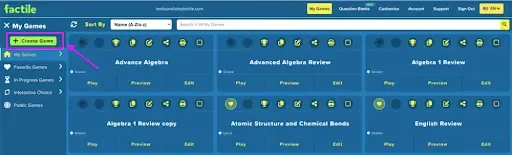
Step 2: Give your game a unique name (for example, “Algebra 1 Review”).
Step 3: Choose between making your game board manually or with AutoGen AI.
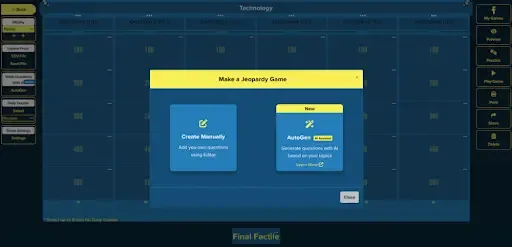
Note: AutoGen AI creates questions for you based on your topic. Learn more about AutoGen AI. When you create your board manually, you will click on each square to add questions and answers.
Step 4: Add category names, questions, and answers to your board. If there are rows or columns you don’t want to use, simply leave them blank and they will not display during the game.
Step 5: Check out Practice Mode for an idea of what to expect before you play with your students. You can learn more about practice mode. It’s especially helpful to try a practice round before using buzzer mode for the first time, just to make sure you have the hang of the steps before asking your students to use them.
Step 6: Save your game and get ready to play!
For more detailed information on creating games, view this guide.
Start to Play
Once your game is ready, it’s time to play. Below, we’ll share a brief overview of how to play Factile with your students.
You can expect it to feel a lot like a traditional game of Jeopardy in the classroom, just with extra features to make things run more smoothly for you and your students.
Step 1: Choose your game and click “play.” See below for a sneak peak of what this will look like on your screen.

Step 2: Choose your game style, number of teams playing, whether or not you want to play in buzzer mode, and your team mascots. Factile will walk you through these choices with a page for each item listed above. Your account will also show the features that are available to you based on your plan type.
Step 3: Click “Begin Game!” It’s time to start playing online Jeopardy with your class.
Step 4: Have your first student choose a square and click on it to reveal the question. A timer will automatically pop up. If you want a more laid back game, you can turn the timer off in your game setting before you play.
Step 5: Have students raise their hands or press their buzzer to answer. When they answer correctly, press the green checkmark next to their team name to award their points. Press the red “x” if their answer is not correct. You can also skip a question if no teams respond.
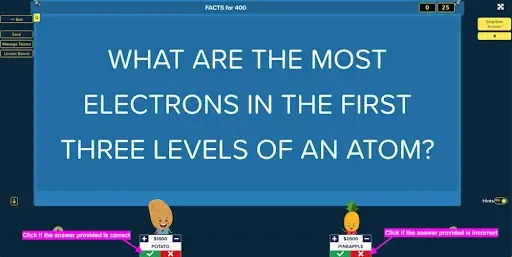
Step 6: Continue playing until all questions have been answered. The team with the most points at the end of the game wins!
For more detailed instructions on playing your first game, read through this guide. Not only does it walk you through each and every step of playing online jeopardy with your class, but it also dives into details like changing the language of your game, switching between traditional and “positive scoring mode” (where students don’t lose points for incorrect answers, playing remote games, and so much more.
Not quite ready to create a game on your own? Consider starting with a pre-made public game. These games are made and shared by Factile users for public use. They can get your Jeopardy journey started while giving you time to process what these games should feel like. You can then take your knowledge and create your own game if you’d like.
Search for a pre-made game on your own or play one of these user favorites:
Keep Things Simple
If you’re feeling at all overwhelmed, don’t worry. You don’t need to use every Factile feature from the start. It’s okay to begin with the basics and add things on one by one as you get to know the platform. Consider starting with the “how-to” above, and then add in extras like:
- Customizing the appearance of your game with school logos, color themes, or personalized mascots.
- Adding sounds, images, and videos to questions and answers.
- Adding a Daily Double or Double Factile feature to your game.
- Adding math equations to your question cards with LaTex.
- Creating new games with AutoGen AI assistance.
- Playing in buzzer mode.
- Playing with multiple students per team.
- Playing in choice, interactive choice, quiz bowl, classic memory, or flashcard mode.
All in all, Factile is an easy tool to master with room to grow in all directions. Start with a simple game today and work in fun features as you go. We’re confident your students will love playing online Jeopardy with you!